Chemistry AI tutor
Chemistry AI that explains every step.
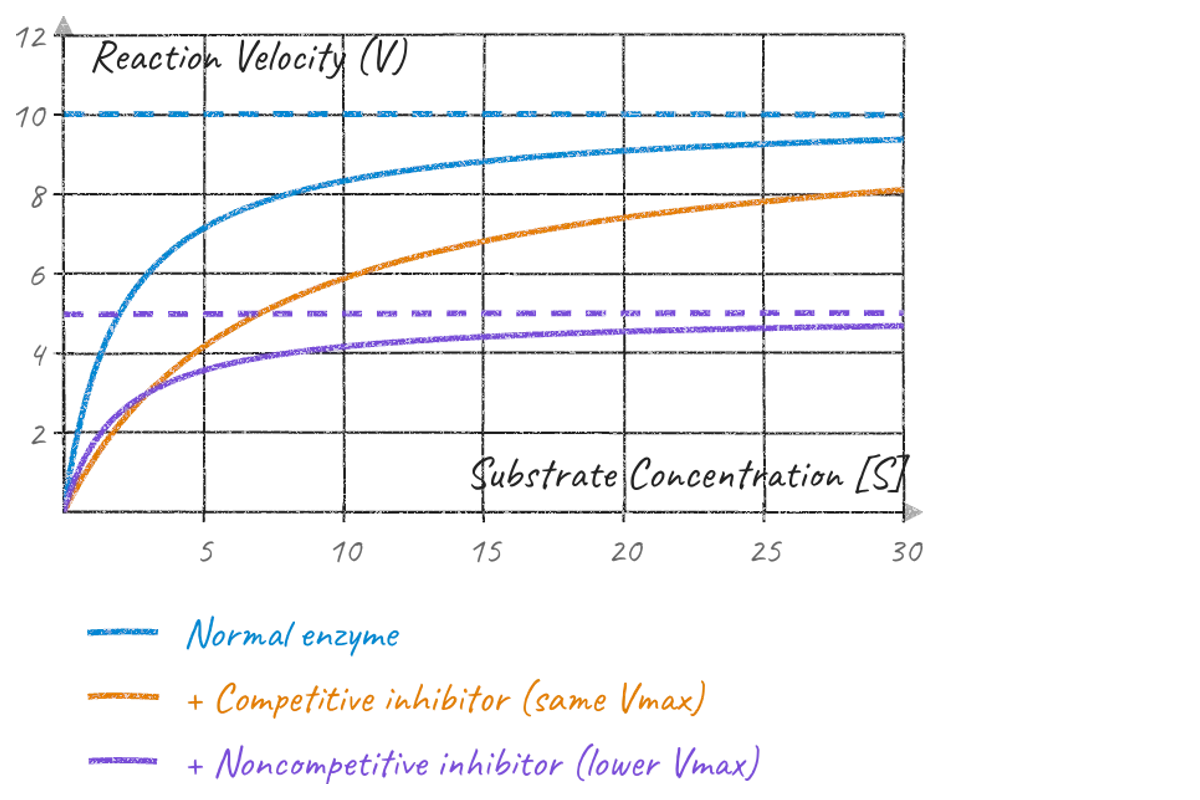
Balancing an equation, counting moles, reading a rate graph: ahaboard talks you through it and draws each step on the board, so chemistry stops being a list of rules to memorize.
How a chemistry lesson goes
Show it the problem
A photo of the question, your notes or a PDF of the chapter. Or ask: “why do I have to balance equations?”
See each step on the board
It writes the equation, counts atoms on each side, draws the diagrams and graphs, and says why each step is done.
Do the next one yourself
It hands you the next step to try and checks your thinking. You leave with notes and a quick quiz.
The chemistry it teaches
- Balancing chemical equations
- Moles, molar mass and stoichiometry
- Atoms, bonding and Lewis structures
- Reaction rates, enzymes and equilibrium
- Acids, bases and pH
Understand it, don't memorize it
- Every rule comes with the reason behind it, drawn, so you can rebuild it in the exam instead of remembering it.
- Ask “why?” as often as you like. It tries another way: a diagram, a simpler example, a side-by-side.
- Before it speaks, it writes private teacher's notes with the worked solution and the likely mistakes.
Good questions
Can it balance chemical equations?
Yes, and it shows you how: it counts the atoms on each side, adjusts one coefficient at a time and explains each move, then gives you the next one to try.
Can it help with stoichiometry and mole calculations?
Yes. It sets up the conversion step by step, from grams to moles to the ratio in the equation, and asks you to do the next line.
Can I upload my chemistry homework?
Yes. Add a photo, a PDF, slides, a text file or a link, and the lesson is built from it.
How accurate is it?
Before it speaks, it writes private teacher's notes with the worked solution and the likely mistakes. Mistakes are rarer, not impossible, so confirm important results with your teacher or textbook.
Does it work on my phone?
Yes, in your phone's browser, with nothing to download. You can also add it to your home screen so it opens like an app.
Up whenever you are, drawing it out until you go “aha!”